
The MCP Standard Tools SuiteApp ships three MCP Apps. An MCP App is a tool that returns a small interactive panel instead of returning text. Your AI client draws it inside the conversation, you click through it, and what you picked goes back to the model as that tool’s result.
| App | Tool name | What it does | Permission to see this tool |
| Prompt Library | ns_prompt_library_app | Browse and use prompt templates from the Companion SuiteApp | None |
| Record Selector | ns_selector_app | Pick an existing record in a workflow that needs one | REST Web Services (Full) |
| Report Filters | ns_report_filters_app | Choose the filters for running a report | None |
The permission column is about the tool appearing in your client, not about what it can hand you. Oracle draws the same line themselves: on the report filters app they write that there are no permission requirements to see the tool, and then, in the next sentence, that your ability to run reports depends on the permissions assigned to your role. Seeing is not doing.
These apps exist because typed prose is ambiguous. Ask for “outstanding invoices” and you may or may not get Expense Reports, may or may not get Drafts. Ask for a P&L and something has to decide the subsidiary, the period and the accounting book. A panel makes you say which. Record Selector exists because “the Acme account” isn’t a record ID.
The answer is: it depends on your client
We ran the three apps against connected accounts on 17 September 2026, in two different AI clients.
| App | Claude, desktop | ChatGPT |
| Report Filters | draws and populates | draws and populates |
| Prompt Library | draws, shows zero of everything | works |
| Record Selector | draws, “could not fetch data” | draws, “could not fetch data” |
The Prompt Library issue is caused at the client. Same account, same connector, same SuiteApp, minutes apart. It works in ChatGPT and comes up empty in Claude. Nothing is wrong in NetSuite and no amount of checking permissions will find it.
Record Selector issue is caused by the app. It draws its panel in both clients and then can’t fetch. Asked for a customer it reports that the record type doesn’t exist, and customer is the example Oracle gives in the tool’s own description.
So “do the NetSuite MCP Apps work” isn’t answerable as one question. One of them depends on the client your people are actually using, one doesn’t work anywhere, and you find out which by opening them. The rest of this page is what each one did and how to run that check yourself.
Report Filters, which worked
This is the entire response ns_report_filters_app hands back to the model:
{“toClaude”:”Ignore this response, it is intended only for the MCP App ns_report_filters_app, wait until the app tells you to continue.”,”initialParams”:{}}
The model gets nothing it can use. It’s stopped until you act. The panel isn’t a nicety layered over an answer the model already has, it’s a hold on the whole exchange. The report does not run until you have said what you meant.
It opened from a bare call with no parameters filled in. Every property on it is optional, so the client doesn’t need to know anything about your reports first. Once it’s open the app works out which filters that particular report actually requires, and that’s the part worth pulling out: the required-ness is decided on the NetSuite side, not guessed at by the model. If the report takes a subsidiary and your account has subsidiaries, you are going to be asked for a subsidiary.
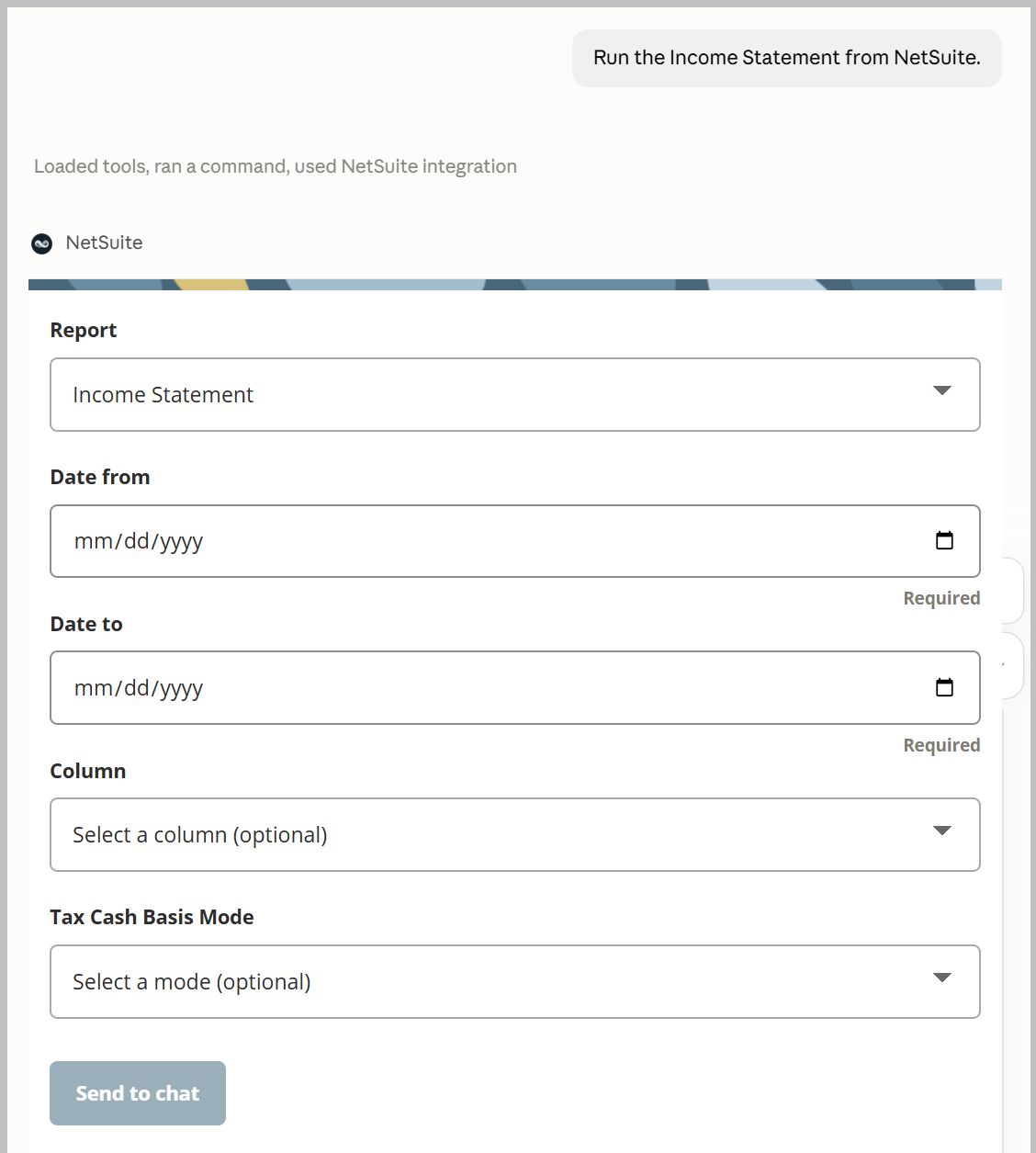
The prompt “Run the income statement” doesn’t name a report.
The account we tested has 385 reports, and at least four of them are titled exactly Income Statement, sitting alongside Comparative Income Statement, Budget Income Statement, Multi-Book Income Statement and Income Statement Detail.
Ask for “the income statement” and something picks one. Nothing about that choice is visible to the person who asked.
Unless the panel opens. The report filters app presents the report list with one preselected and lets you change it, which makes it the only place that choice ever surfaces. Call ns_runReport directly and you never find out there were four.
So the ambiguity starts a step earlier than the subsidiary and the period. It starts at which report, and the panel is what makes that visible.
An assistant will pick a report for you, and it may pick well
Asked to run the Income Statement, with no report named, ChatGPT resolved it to report -200 and opened the filter panel already set to that choice. Four reports in that account carry exactly that title. Nothing in the request distinguished them.
Report -200 is the good one. It’s the labeled statement with real account numbers, and its bottom line is net income. Left to itself, the assistant chose sensibly. Note that any report ID that is negative is a default NetSuite report without customizations.
That’s worth saying plainly, because the alarming version of this story would be wrong. The risk isn’t that an assistant picks badly. It’s that it picks invisibly, and that the same request could just as easily have landed on one of the other three, which return unlabeled rows and a total that isn’t net income.
The panel is what makes the pick visible. It shows you which report was selected and lets you change it. Call ns_runReport directly and nothing surfaces the choice at all.
We also checked that the panel’s controls come from report metadata rather than from the client. Report -200 supports cash basis reporting and its panel offers the choice; report 110 doesn’t and its panel doesn’t. Switching the report inside a single client turns that control on and off. Nothing malfunctioned.
Then we ran the reports ourselves, which is where it stops being a point about tooling.
Then we ran both and compared them
Reports labeled Income Statement
| Data point | Report 109 | Report 110 | Report -200 |
|---|---|---|---|
| Returned summary | $1,351.21 | $6,214.21 | N/A |
| Income / Sales | $1,332.88* | $1,332.88 | $1,336.89 |
| Other income / Shipping | $18.33* | $18.33 | $18.33 |
| Cost of Goods Sold | — | $689.00 | ($689.00) |
| Expense adjustment | — | ($5.00) | — |
| Repairs & Maintenance | — | $4,179.00 | ($4,179.00) |
| Other Expense | — | $0.00 | $0.00 |
| Gross Profit | — | — | $647.89 |
| Net Ordinary Income | — | — | ($3,531.11) |
| Net Other Income | — | — | $18.33 |
| Net Income | — | — | ($3,512.78) |
Same account, same date range, 1 April 2025 to 17 September 2026, called directly through ns_runReport.
Report 109 returned three numbers and nothing else.
{“0”:{“label”:null,”summaryLineValues”:[{“Amount”:79.31}]},
“1”:{“label”:null,”detailLineValues”:[{“Amount”:75.98}]},
“2”:{“label”:null,”detailLineValues”:[{“Amount”:3.33}]}}
Every label, alias and value is null. Three rows, no account names, no structure. The report is titled “Income Statement” and it tells you 79.31.
Report -200 returned a real statement. Thirty-four rows, account numbers and all: 4000 Sales 79.99, Cost of Sales 0.00, Gross Profit 79.99, 6220 Repairs & Maintenance 3,582.00, Net Ordinary Income (3,502.01), 8030 Shipping Income 3.33, Net Income (3,498.68).
Report 110, the third one, returned a different answer again. Five unlabeled rows, classified only as Income or Expense: 75.98, 3.33, 0.00, (5.00), 3,582.00. Its summary figure is 3,656.31.
Add those rows up and that is exactly what you get. The summary is the rows totaled with the expenses treated as positive, revenue and costs added together as though they were the same thing. It is not net income and nothing in the response says it isn’t.
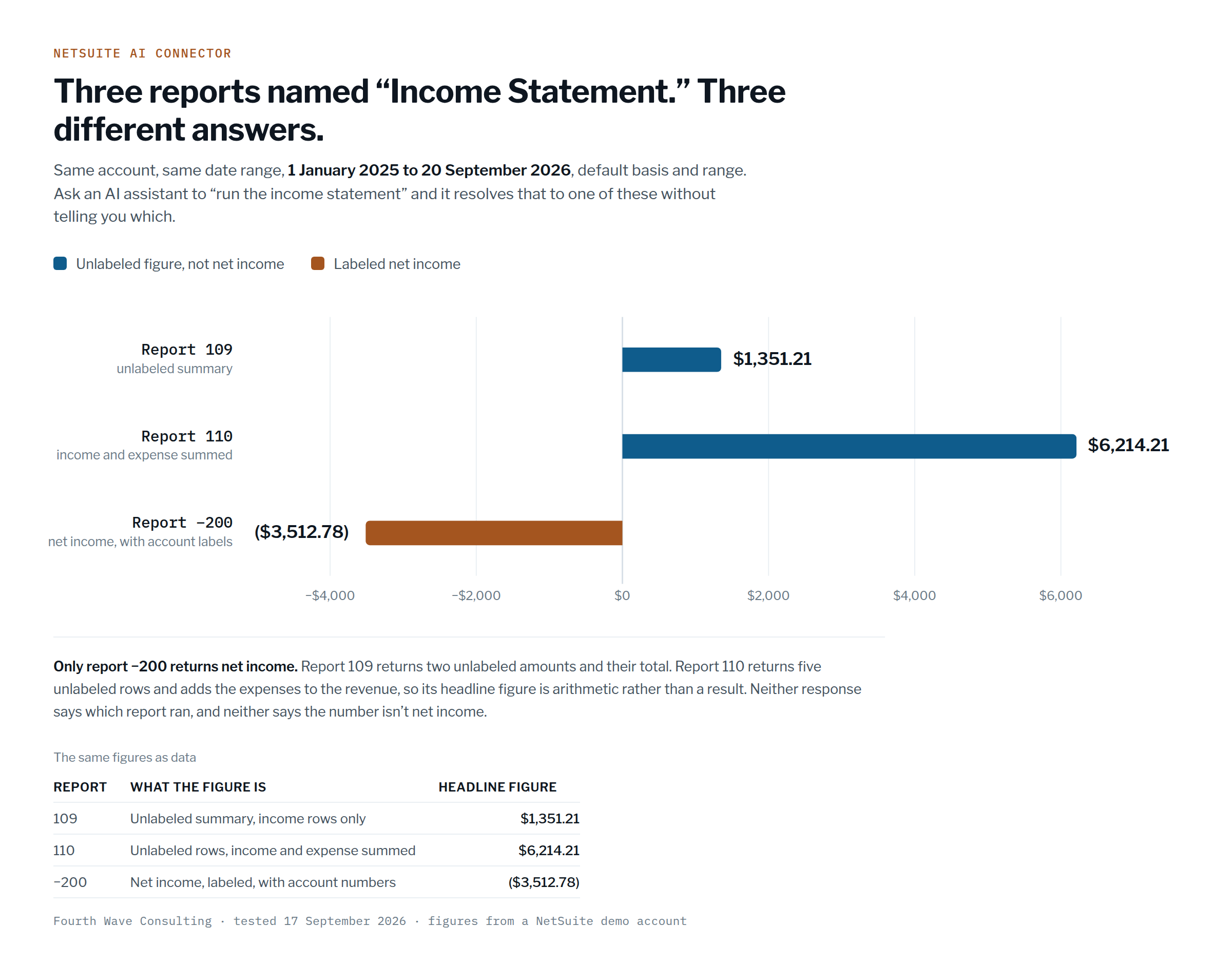
So, three reports, one account, one date range, one question:
| Report | Answer | What it actually is |
| 109 | $79.31 | the two income rows only, unlabeled |
| 110 | $3,656.31 | income and expenses summed together, unlabeled |
| -200 | ($3,498.68) | net income, labeled, with account numbers |
A positive 3,656 and a negative 3,499 are seven thousand dollars and a sign apart. All three are titled Income Statement. Two of the three label nothing, so the response itself gives no clue which one you are holding.
The list offers reports you can’t run
One more, found by accident while running the above.
ns_listAllReports returned report 355, Income Statement w Margin %. The filter panel offered it. Running it returned:
Unable to run report 355 Income Statement w Margin %. You do not have access to this report.
So the report list isn’t filtered to what your role can execute, and nothing tells you until you run it. Worth knowing before you build anything that walks that list, and worth knowing if you are the person who picked a report from a dropdown and got an error you can do nothing about.
And you can’t go look at the report
We tried to open 109 and 110 to see how they were built. As an administrator of the account, working from a role that runs these reports without complaint.
| Route | Result |
| Reports > Saved Reports > All Saved Reports | not listed. That page doesn’t show saved reports that were never made public, even to an administrator |
| SDF object import in VS Code | reportdefinition isn’t offered as an object type |
| SELECT * FROM report | Invalid search type: report |
| SELECT * FROM customreport | Invalid search type: customreport |
| SELECT * FROM reportdefinition | Record ‘reportdefinition’ was not found |
So the assistant ran a report, returned a number, and the person accountable for that number has no route to the definition behind it. Not through the UI, not through the developer tooling, not through SuiteQL.
That matters more than what 109 and 110 turn out to be. Two of the three Income Statements return unlabeled rows, one of them adds expenses to revenue and calls the result a summary, and neither can be inspected by the administrator of the account. The audit trail ends at an integer.
If you are being asked to put this in front of a finance team, that is the question to raise. Not whether the AI can read NetSuite. Whether anybody can check afterwards what it read.
This was a test account, so the amounts are small. The shape is the point, and the shape does not shrink with the numbers.
Three things in the raw output worth knowing
Whatever your client shows you, this is what it was handed, and it has traps in it.
The unlabeled report still produced a confident answer. Report 109 returns no labels at all, and the assistant we ran it through said so, that it couldn’t identify the accounts behind the amounts. Then it totaled them and reported 79.31 anyway. A number it could not explain, presented as an answer.
The summary line is not the bottom line. ns_runReport describes itself as returning “the column values from the report’s summary line,” which sounds like the number you want. On report 110 that line is 3,656.31, which is revenue plus expenses. On report -200, row 0 carries -10,496.04, labeled only “Financial Row” with no name, while Net Income is -3,498.68 thirty-one rows further down. On neither report does the summary line mean what a reader would assume.
The signs don’t agree between parent and child. The Expense group comes back as +3,582. The account under it, 6220 Repairs & Maintenance, comes back as -3,582. Same money, opposite signs, one row apart. Anything that adds these up without knowing which level it’s on will be wrong, and plausibly so.
None of those three is visible in a rendered answer. All three are what a model is working from.
If you take one thing from this page, take this. The panels are not there to slow you down. They are there because a sentence does not contain enough information to identify a report, and the gap gets filled either way, silently, by something that will not tell you it chose.
The panel knows things the model doesn’t
Open the filters for a report that supports column grouping and you get a dropdown of the ways that report can be split into columns, by department, class, location and so on.
Now look at what the model gets for the same field. The range parameter arrives as a plain string described as “column grouping for report columns,” with no valid values listed. They aren’t in the tool’s schema and they aren’t in ns_listAllReports, which reports supports_range: true and stops there. Nothing the model can call tells it what may go in that box.
The panel has the list. The model has a free-text field.
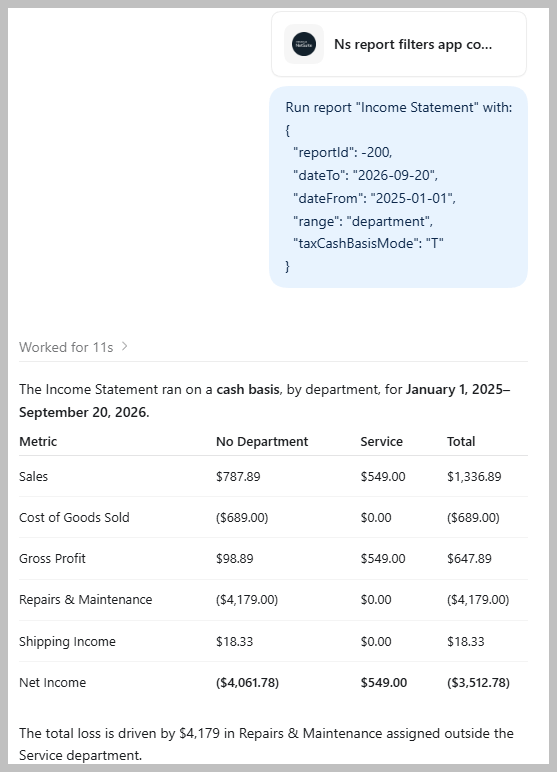
And it will fill it. In one of our runs the assistant called the report with “range”: “all”, a value it was never given and could not have looked up, and the call succeeded. Which is the part to sit with: the query working tells you nothing about whether the value was the one you wanted.
Compare that with the cash basis setting on the same panel, where the valid values are T, F and NEXUS and the schema spells all three out. There the panel is a convenience. On column grouping it is the only place the real options exist.
That is also evidence about how the panel is built. The report we opened carries supports_cash_basis_mode: true and supports_range: true in its metadata, and those were exactly the two controls that appeared. The panel is assembled from the report’s own definition, not from anything the model decided.
Record Selector, which fails in both clients
Ask for a customer picker and the panel opens, in Claude and in ChatGPT alike. Then it fails: the selector could not fetch data, record type customer does not exist.
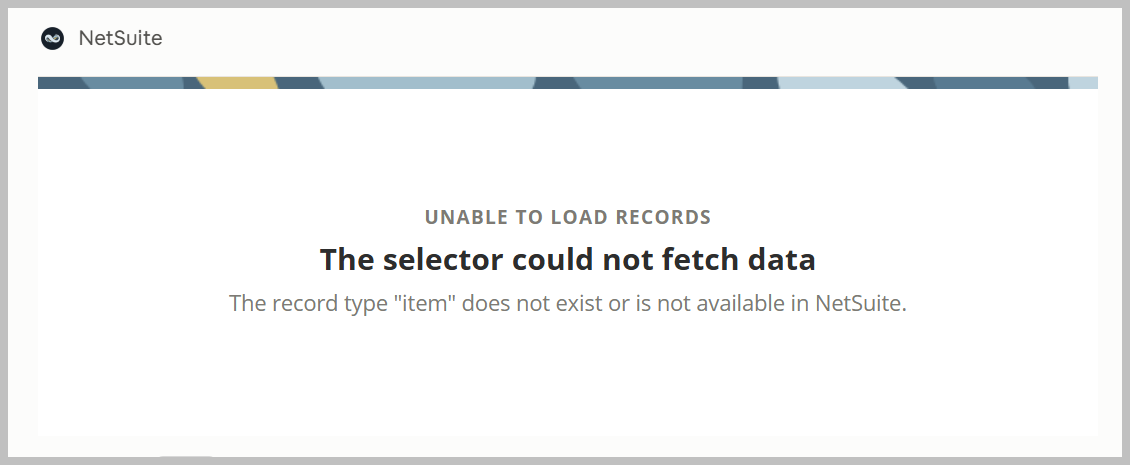
Same message in both clients. Same message called cold, with nothing in progress, and called from inside an update-a-customer workflow where a record genuinely had to be chosen before anything could be written. Two accounts. Repeatedly.
We tried four record types. All four failed the same way.
| Record type | A real REST Web Services record type? | Result |
| customer | yes | does not exist or is not available |
| contact | yes | does not exist or is not available |
| inventoryItem | yes | does not exist or is not available |
| item | no, REST has inventoryItem, assemblyItem and so on | does not exist or is not available |
customer and item are the two examples Oracle gives in the tool’s own description. contact and inventoryItem we added because they are unambiguously real. Nothing worked.
Note what the error says: does not exist or is not available in NetSuite. That will send an administrator into the account looking for a disabled feature or a missing permission, and there is nothing there to find. The record types exist. The Record tools reach them. SuiteQL reaches them. Only the selector can’t.
It is not a permissions problem. The tool requires REST Web Services (Full), and per Oracle’s own documentation a tool only appears in your client if your role has what it requires, so the tool being visible means the role has it. The same role reads customers without trouble. SuiteQL against that account returns 5,979 of them.
And customer is not a guess. It is the example Oracle gives, twice: in the tool’s own description (“for example, customer or item”) and on the Help Center page for ns_selector_app.
It also isn’t a matter of calling the app outside its intended context. Oracle’s record tools overview describes the selector as being for “create or update record workflows,” which is narrower than the tool’s own page, which says “any workflow that requires record selection” and names analysis as a valid use. We tested the narrow reading: asked from inside an update workflow, with a record genuinely needed before anything could be written, it failed with the same message. Called cold, same message. The context doesn’t change it.
This is the one to test first in your own account, because Record Selector is the app that feeds the Record tools, and the Record tools are the ones that write. It’s what you would reach for in a create-or-update workflow. Finding out it doesn’t work after you have designed around it is worse than finding out now.
You can see the failure. The model can’t.
This is the part that generalizes past the app, and past this year.
You get an error panel. The model gets this:
“Selector app opened.”
That is the entire response. It is also, character for character, what comes back when the tool is called with a deliberately invented record type, zzzznotarealrecordtype. Real record type, imaginary record type, broken fetch: one cheerful string for all three.
So nothing tells the model the pick failed. It has no reason to mention it, no reason to stop, and no reason not to proceed as though you had chosen someone. In our test that is exactly what happened: the assistant moved on and selected a customer by querying, out of 5,979, and presented the result as an ordinary answer.
The person watching the screen could see it break. The thing deciding what to do next could not.
When you are evaluating AI tooling for a finance team, that gap matters more than which app works this quarter. A tool that fails loudly costs someone ten minutes. A tool that reports success while failing costs you whatever got built on top of it, and you find out later.
What happens instead
Nothing announces the failure. Ask an AI client to pick a customer, watch the picker not appear, and the model does what a model does: it queries instead and picks one. In our test it chose a customer out of 5,979 with no input from anybody.
That’s the whole argument for these panels, demonstrated by its absence. The answer looks completely normal.
Prompt Library, which drew an empty panel in Claude
It needs a second SuiteApp
This is the one that’ll waste your afternoon before you get anywhere near the rendering problem below. ns_prompt_library_app does nothing unless the NetSuite AI Connector Service Companion SuiteApp is installed. That’s where the templates actually live. The MCP App is just the front end.
Once it’s in, you ask your client to open the Prompt Library, browse or filter, pick a template, edit the prompt text in the input field, and submit. The editable step is the part I like, you’re starting from something written by somebody who knew the NetSuite idioms, and adjusting it, rather than handing over control.
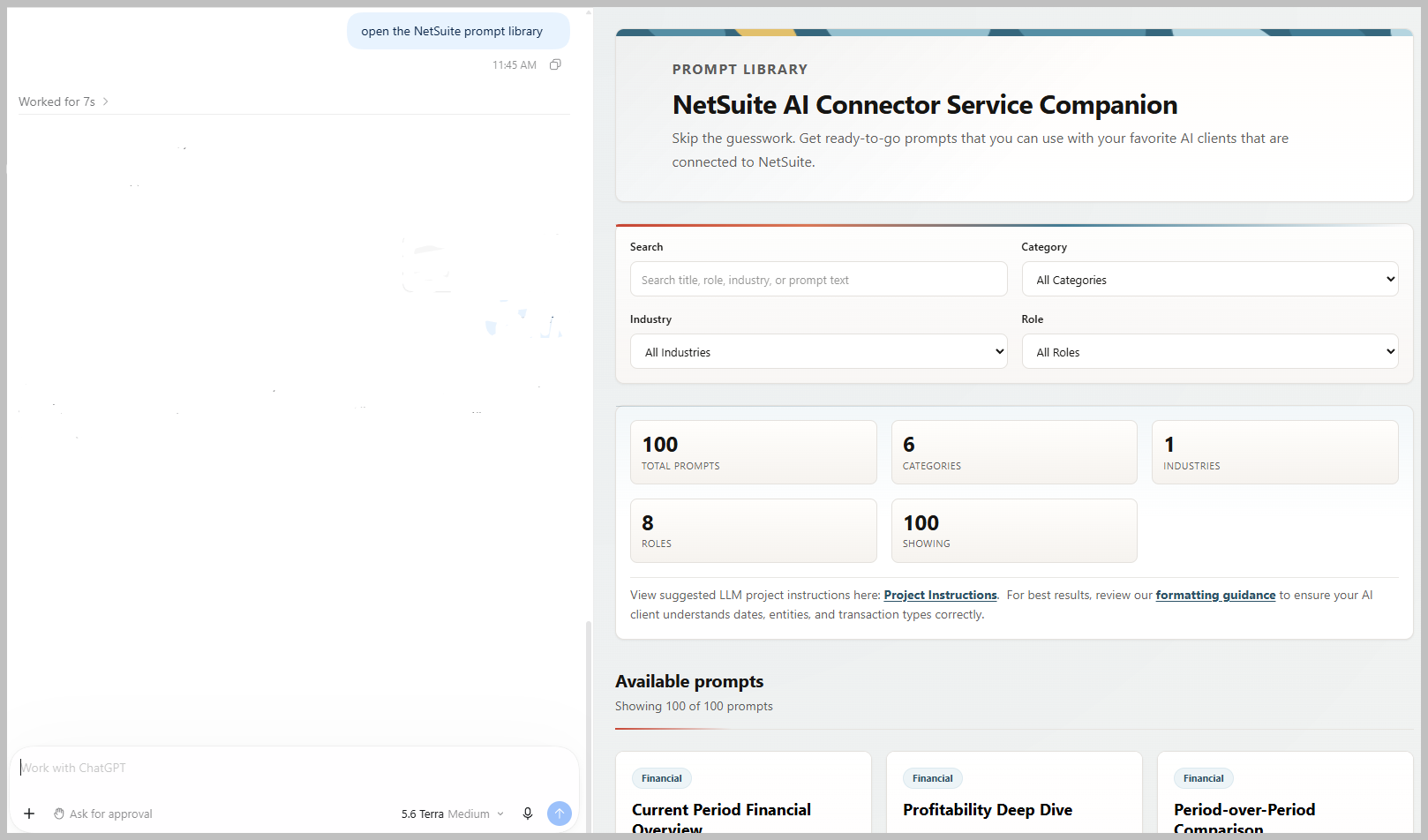
The app returns the standard templates plus public custom prompt templates from your own account, so you can add your own. A finance team that keeps rewriting the same five questions every month could write them once, publish them, and have everybody start from the same wording. I’d rather do that than run another training session on it.
The panel came up empty in one client and worked in another
With the Companion SuiteApp installed, opened from Claude on the desktop, the Prompt Library drew its panel and reported 0 total prompts, 0 categories, 0 industries, 0 roles, showing 0 of 0.
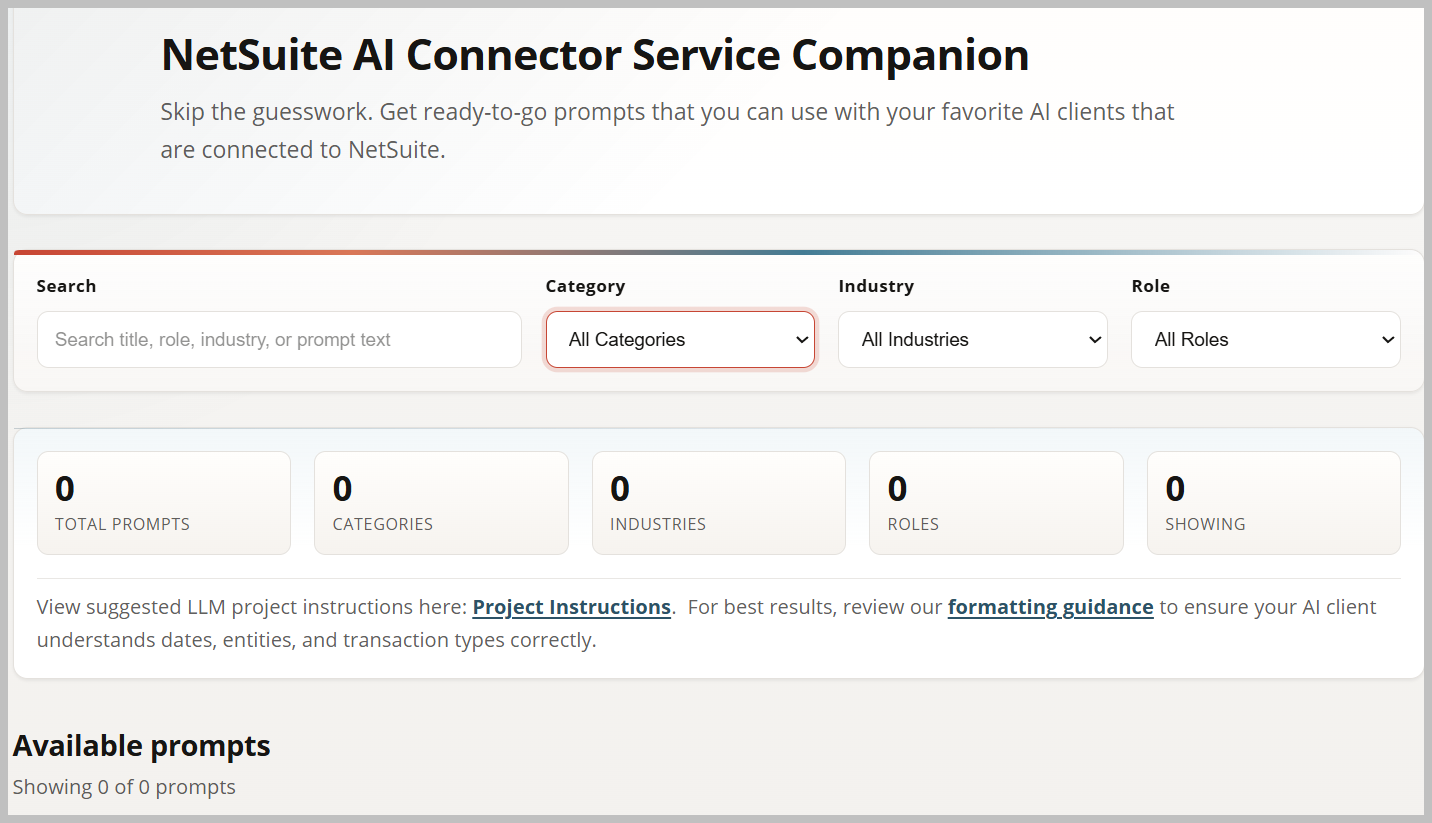
The same call handed the AI client 100 templates.
Opened from ChatGPT against the same account, it worked.
Read that twice, because it’s backwards from the thing everyone worries about. The panel exists so a person decides instead of a model guessing. In the client that failed, the model received the whole library and the person got an empty picker. Nothing errored. The search box, the three filter dropdowns and the counters all rendered exactly as they should, showing nothing.
If you open it and see zeros, the library is not missing, the Companion SuiteApp is not broken, and there is nothing to fix in NetSuite. The data reached the connector and stopped before the screen. Open it in a different client before you spend an afternoon on your account.
How we know it’s the client and not NetSuite
The app takes an optional filter string, which the client can prefill so the panel opens already narrowed. We called it with filter: “cash”.
NetSuite did its part. The response came back carrying all 100 prompts and “initialParams”:{“filter”:”cash”}.
The panel opened with an empty search box and every counter at zero.
So the panel didn’t receive the prompt list, and it didn’t receive the prefilled filter either. It rendered with nothing at all. Whatever passes the tool’s response into the panel isn’t happening in that client, and no configuration on the NetSuite side will change it.
Two practical consequences. Don’t debug your account over this. And if you are choosing a client for a finance team, this is the class of thing to test rather than assume, because it is new plumbing and it is being built at different speeds in different places.
What’s actually in the library
These counts are from the payload the connector returned, not from the panel, which showed none of it in Claude.
| Category | Templates |
| Financial | 40 |
| System Administration | 26 |
| Procure to Pay | 15 |
| Order to Cash | 14 |
| Visualizations | 4 |
| Item Management | 1 |
Each one is tagged by role. Controller on 45 of them, CFO on 34, Administrator on 26, CEO on 24, A/R Analyst on 23, A/P Analyst on 18. Every single one is tagged “All Industries,” so don’t expect the tagging to narrow anything by sector.
Two things in there are worth a controller’s attention.
Thirty-three of the hundred write. Twenty-seven call ns_createRecord and six call ns_updateRecord. The rest read, mostly through ns_runReport and ns_runCustomSuiteQL. Nothing stops anyone from seeing those thirty-three, because no permission is needed to browse the library at all. Whether one of them actually runs comes down to the role, which needs REST Web Services (Full) for the Record tools. Seeing is not doing, again. It is still worth knowing that “have a look at the prompt library” puts a create-a-record template two clicks from somebody.
The templates have blanks in them. [subsidiary] appears in 21 of them, [Date] in 26, plus [period], [Account Number], [Customer], [Class Name] and the rest. A template is not a finished question. It’s the same ambiguity the filter panel exists to close, moved one step earlier, and if you paste one and leave the brackets in, something downstream is going to decide what you meant.
When they come up on their own
Two of the three are meant to. Report Filters says to use it when the user “has NOT EXPLICITLY specified all required parameters,” or when the report needs a subsidiary and the account has subsidiaries. Record Selector says to use it when “the user has not already provided the required record value.” The moment you didn’t think to be specific is the moment they are built for.
The Prompt Library is the exception. It carries no such condition, and the documentation tells you to ask your client to open it by name. That one you reach for deliberately (“Open the NetSuite prompt library”) .
The honest limit
Two different things are going on and it’s worth keeping them apart.
Once a panel is open, it holds. The app decides what that report requires and you don’t get past it by being vague.
Opening it is the part nothing enforces. That’s a judgment the client makes, guided by the tool description, and nothing stops a client from skipping the panel and calling ns_runReport with its own guess at your subsidiary and your period. Which is the whole risk: the protection is real and the decision to use it isn’t yours.
So treat these as a convenience that improves answers, not as a control that constrains them. The control that is real is the role the connector runs under. That’s the companion page: getting reliable answers out of the NetSuite MCP.
Test them yourself, it takes five minutes
Worth doing before you plan anything around them, and worth repeating after a release.
Do it in every client your team uses, not just one. That’s the whole lesson above.
- Ask your client to run a report without naming the subsidiary or the period. The Report Filters panel should appear.
- Ask it to pick a customer, without naming one. The Record Selector panel should appear.
- Ask it to open the NetSuite Prompt Library. The panel should appear and show a non-zero count.
Anything that misbehaves, try the same step in a second client before you go looking in NetSuite. An empty panel that works elsewhere is not an account problem and no amount of checking permissions will find it.
If your results differ from ours, we’d like to know. This page is a snapshot of two clients on one day, and it’s only useful if it stays current.
Stuck on one of these? The first hour is free. Bring us your connection and we’ll test it in your account.
Setting the connector up in the first place is the other page: connecting Claude or ChatGPT to NetSuite.