
I’ve closed the books in NetSuite for companies from $1M to $200M in revenue, in ecommerce and utilities. This is the checklist I actually run, not the one you’d find in a help article. The order matters more than any individual step, and most of what goes wrong happens because something closed out of sequence or because a green checkmark got trusted a little too far, not because a number was flat-out wrong.
The order
Subledgers close before the period locks, and they close in this order:
- Inventory. Every item receipt and shipment for the period has to be posted before you touch anything else, because AP and COGS both depend on it. If a receipt lands after you’ve started reconciling, your average cost shifts and every rec you already did is wrong.
- AP. Enter and approve every vendor bill for the period, including the ones sitting in somebody’s inbox that haven’t been keyed in yet. Run your three-way match (PO, receipt, bill) before you accrue for anything, or you’ll double up.
- AR. Bill everything that shipped or was delivered in the period. If you’re waiting on a signed proof of delivery to invoice, that’s a cutoff decision, make it consistently every month, not case by case.
- Payroll. Post the payroll journal entry from your provider (ADP, Paychex, whoever) before you touch the payroll clearing account.
- Manual journal entries. Accruals, amortization, allocations, revenue recognition and reclassification if you’re on Advanced Revenue Management, foreign currency revaluation and consolidated exchange rates if you run multi-currency subsidiaries, intercompany elimination if you’re on OneWorld. Last, because everything above should already be true before you adjust for what’s missing.
Only after all five are done do you work through the Period Close Checklist itself: lock AR, lock AP, then Lock All. Lock All is where people get confused. It doesn’t do anything on its own beyond finishing whatever AR and AP locking is still outstanding, it isn’t a broader control on the general ledger, and you still have to run it even after AR and AP are already closed individually, or the rest of the checklist stays greyed out. Locking early and then having to reopen a period to fix something is worse than taking an extra day. Reopening one requires a written justification, and that justification is the first thing an auditor asks about.
What’s actually on the Period Close Checklist
If you haven’t opened the actual checklist page in a while, it’s worth walking through what each task does, because half of them aren’t obvious from the name. You also can’t skip ahead. If a prior period is still open, NetSuite throws up a warning and won’t let you touch this one until that’s closed.
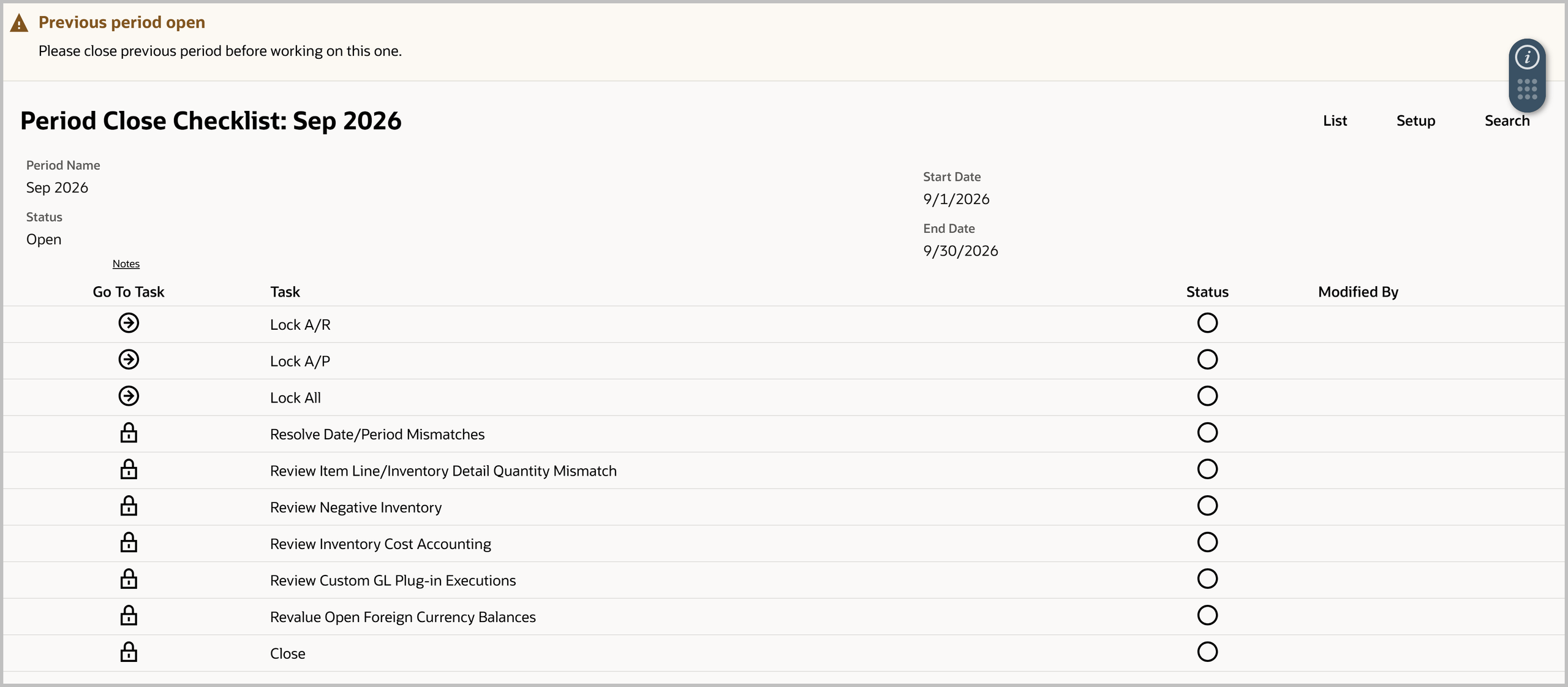
Lock A/R and Lock A/P stop new AR and AP transactions from posting to the period. They don’t touch each other and they don’t touch the GL directly, they’re scoped to their own subledger.
Lock All just finishes whichever of A/R and A/P you haven’t locked yet, in one click. It isn’t a separate, broader control, and you still have to run it even after locking A/R and A/P individually or the rest of the checklist stays greyed out.
Resolve Date/Period Mismatches catches transactions where the transaction date and the accounting period they’re coded to don’t agree, a bill dated the 28th that got keyed into next month, for example. This is where cutoff mistakes actually surface.
Review Item Line/Inventory Detail Quantity Mismatch checks that the quantity on inventory detail, serial numbers, lot numbers, bins, matches the quantity on the transaction line itself. These usually come from a partial fulfillment or somebody hand-editing the detail after the fact.
Review Negative Inventory flags anything that went negative in the period, meaning you shipped more than the system had on hand at that moment. This is the task that most often points back to a receipt that got entered late or landed in the wrong period.
Review Inventory Cost Accounting checks that the cost postings behind inventory transactions are seated correctly. Worth real attention on standard or average costing, where a late transaction can throw off the cost layer for everything that came after it.
Review Custom GL Plug-in Executions only shows up if you’re running the Custom GL Lines plug-in with accounts that post asynchronously. It confirms those postings actually finished instead of hanging.
Revalue Open Foreign Currency Balances runs currency revaluation for any subsidiary with multi-currency enabled, restating open AR, AP, and bank balances in a foreign currency to the period-end rate.
Close is the last task, and it only unlocks once everything above it is done. Once you click it, nothing else posts to that period without a formal reopen.
On a OneWorld account with more features turned on, this same list also picks up Create Intercompany Adjustments, Calculate Consolidated Exchange Rates, Eliminate Intercompany Transactions, Recognize Revenue and Reclassify Revenue (if you’re on Advanced Revenue Management), and Create Period End Journals or GL Audit Numbering if those features are enabled. Each one is tied to a specific feature flag, so the checklist you’re looking at is never quite the same as the one on someone else’s account, which is worth remembering before you compare notes with another controller.
The reconciliations that actually catch something
Bank. Obvious, but the trap isn’t the reconciliation itself, it’s outstanding items that have been sitting for more than a cycle or two. A check that’s been outstanding for three months either needs to be voided and reissued or it’s telling you something about a vendor relationship.
AR control account to the AR aging summary. These should tie exactly. When they don’t, it’s almost always a journal entry posted directly to the AR account instead of through a credit memo or payment application. Somebody “fixed” a balance with a JE and broke the sub-ledger tie-out. Find it and reverse it properly instead of JE-ing over it again.
AP control account to the AP aging summary. Same trap, same fix. If you have a recurring variance here every month, someone on the team has a habit worth breaking.
Inventory valuation to the balance sheet. Run the Inventory Valuation report and tie it to the inventory GL account. If you’re on standard costing, the variance accounts should explain the difference. If you’re on average cost, a mismatch usually means a negative inventory situation somewhere, an item that shipped before it was received.
Fixed assets. Run depreciation before you close, and reconcile the FAM roll-forward to the fixed asset and accumulated depreciation accounts on the balance sheet. An asset added mid-month with the wrong in-service date will throw this off in a way that’s easy to miss until year-end.
Intercompany. If you run multiple subsidiaries, every intercompany transaction needs a matching entry on both sides before consolidation, and your elimination entries need to net to zero. If the elimination run errors out, check whether the intercompany GL account has been granted access to all the subsidiaries involved in the elimination, not just the two doing the transacting. That’s the setup gap that causes most of the failures, and it’s easy to overlook because it doesn’t announce itself until you actually run the process.
Undeposited funds. This account should be empty, or match deposits that are genuinely in transit. If it’s carrying a balance that doesn’t tie to anything, somebody recorded a payment without deposit and it’s just sitting there.
Payroll clearing. Zero out after the payroll JE and the actual funding transaction hit. If it doesn’t zero, either the JE amount is wrong or the bank feed hasn’t caught up.
What a green checklist doesn’t actually prove
This is the part that trips up teams who’ve started leaning on NetSuite’s own close dashboards. A completed task and a completed accounting process aren’t always the same thing, and Oracle’s own documentation says so if you read it closely.
Foreign currency revaluation, intercompany adjustments, revenue recognition, and revenue reclassification can all be marked complete on the Period Close Checklist after you’ve simply reviewed the page, without the underlying process ever having run. That’s not a bug, sometimes a process genuinely isn’t needed in a given period, but it means green means “someone looked at this,” not “this happened.” If you use Quick Close, the same thing is true across the board, it can mark tasks complete without running them, and it’s meant for periods where you’re certain nothing further is required.
If you’re using Intelligent Close Manager, the Task Completion percentage on the dashboard is weighted off posted AR and AP activity specifically, not the whole close. A high number there says nothing about whether your reconciliations, accruals, or variance explanations are actually finished. The Reviewer field has a similar gap, it identifies who performed a lock, not who reviewed the accounting behind it, and in a OneWorld account it can show you a name tied to a different subsidiary’s lock in the same period. And if you manage multiple subsidiaries, the consolidated ICM view doesn’t roll up child-subsidiary tasks, so the parent-level dashboard was never meant to be read as one enterprise view. Most controllers running multi-entity closes end up keeping a shadow spreadsheet for exactly this reason, because the dashboard genuinely doesn’t show everything.
None of this means the tools are broken. It means a checkmark tells you what it was designed to tell you, and it’s worth knowing exactly what that is before you sign off on the strength of it.
What only goes wrong once a quarter
Multi-currency revaluation. Run it subsidiary by subsidiary. Checking “include children” on the parent to save time doesn’t work the way it does elsewhere in NetSuite, it makes every GL account disappear from the list instead of revaluing them, so the process just silently doesn’t run.
Commission and bonus true-ups. Monthly accruals are estimates. At quarter close somebody has to true them up against what actually got paid or approved, and that true-up is easy to forget because it isn’t a recurring task, it’s a one-time catch-up entry every three months.
Sales tax filed quarterly. Some states file monthly, some quarterly, and if your filing cadence doesn’t match your close cadence, the sales tax payable balance on the books won’t match what you actually remitted that period. Reconcile against the actual return filed, not against what the system calculated, because exemptions and adjustments happen outside NetSuite.
Consolidation timing across subs on different close schedules. If one subsidiary closes a day or two behind the others, whoever runs the consolidated report needs to know that, or the parent-level numbers include one sub’s stale month.
Cycle count adjustments landing in the wrong period. If physical counts happen right at period-end, the adjustment journal entry sometimes posts a day or two late and lands in the new period instead of the one it belongs to. Worth a specific check at quarter-end because the dollar amounts tend to be bigger than a normal month’s variance.
A late change nobody re-traces. An accrual gets revised at 4pm on the last day, after the reconciliation and the variance explanation were already written. The journal gets updated. The reconciliation and the commentary underneath it don’t, because nobody remembered they existed. This one doesn’t respect monthly versus quarterly, but it gets worse the more subsidiaries and the more hands are involved, which is exactly the quarter-end situation.
None of this is complicated. It’s just a lot of small things that have to happen in the right order, by the right person, every single time, and the ones that get skipped are never the ones on anybody’s checklist until the quarter they finally cause a problem.
If your close still runs on tribal knowledge instead of a written sequence, or the same reconciliation breaks every quarter for the same reason, that’s usually a NetSuite setup problem, not a people problem. Fourth Wave has been doing this kind of NetSuite work since 2003, and closing the books is where most of that experience comes from. Get in touch if you want a second set of eyes on your close.