NetSuite Next readiness, from the evidence
We asked two Oracle AI tools for the same income statement and got answers $68,000 apart NetSuite Next is rolling out with 2026.2. Your administrators will be notified by a banner on their home page when NetSuite Next is ready for your account. Then your administrator can grant access by role. Your data, roles, permissions,…
We asked two Oracle AI tools for the same income statement and got answers $68,000 apart
NetSuite Next is rolling out with 2026.2. Your administrators will be notified by a banner on their home page when NetSuite Next is ready for your account. Then your administrator can grant access by role. Your data, roles, permissions, customizations and workflows stay the same, with no migration and no reimplementation. It’s available in the United States and Canada, with more countries coming.
Ask Oracle also runs on the current version of NetSuite, which Oracle now calls NetSuite Today. You don’t have to take NetSuite Next to turn it on. Oracle built it that way so people can get familiar with AI before they switch.
So there are two decisions, not one. NetSuite Next brings a redesigned interface, canvases for pulling insights together, and the assistant. Ask Oracle on its own is available now.
Oracle also ships a second AI path into the same account, the NetSuite AI Connector. It speaks the open Model Context Protocol so Claude, ChatGPT and other assistants can query NetSuite directly. We asked both of them the same question, in the same account, on the same day.
“Run the income statement for 1/1/2025 to 9/20/2026.”
Same report, two answers
Both tools ran the standard Income Statement, report −200. That’s the one you get from Reports > Financial, and you can see the ID in the URL when you open it.
| Net income | How it read the dates | |
|---|---|---|
| Ask Oracle | $250,409.81 | Accounting periods Jan 2025 through Sep 2026 |
| AI Connector | $182,530.44 | Transaction dates 1/1/2025 through 9/20/2026 |
Ask Oracle’s number matches the report when you run it yourself. It also told us what it did: “NetSuite adjusted your requested range to the accounting periods Jan 2025 through Sep 2026 since the Income Statement runs by period rather than an exact day cutoff.”
The connector’s number doesn’t match the report at all. It filters on transaction date, and NetSuite’s financial reports filter on posting period.
Two things make up the difference.
Ten checks in the account are dated in 2025 and 2026 but posted to Feb 2012. The income statement leaves them out because Feb 2012 isn’t in the range. The connector counts them because their dates are.
Invoices dated 9/25/2026 fall in the Sep 2026 period. Ask Oracle includes them, even though the question stopped at 9/20. The connector doesn’t.
Neither tool did anything unreasonable. A period-based report can’t stop on the 20th, and Ask Oracle said so. The connector did exactly what the dates said. But only one of them ties to the books, and the one that doesn’t gave no sign of it.
The Feb 2012 checks are an odd case. The pattern behind them isn’t. A bill that arrives late and gets posted to the open period, a prior-period adjustment, anything backdated: in all of those the posting period and the transaction date disagree. That happens in most accounts every month-end, and every time it does, a date-based answer and a period-based answer drift apart.
One preference moved net income by $252,000
The first time we asked, the account was set to cash basis. Ask Oracle said so in its answer, and net income came back as ($1,522.78). Open invoices don’t count as revenue under cash basis, and this account had a lot of them.
We switched the account to accrual and asked again. Net income was $250,409.81.
The setting is Setup > Accounting > Accounting Preferences > General subtab > Cash Basis Reporting. It’s account-wide. Changing it changes every standard report that supports cash basis, for every user, and Ask Oracle’s answers follow it.
The connector has its own cash basis option. We ran it both ways, before and after the change, and got the same number each time. The connector’s number only moved when the account preference moved.
Most users will never open Accounting Preferences. They’ll ask for net income and get whatever basis somebody set years ago. Ask Oracle mentioned cash basis the first time. The second time, on accrual, it didn’t say which basis it used.
What Ask Oracle told us, and what it didn’t
It said it ran “the standard Income Statement.” It said it changed the date range to periods and why. It named the subsidiary scope. It labeled every figure. It linked to the full report.
It didn’t say which report ID it ran. You find out by clicking the link and reading the URL.
And in the same answer it said “Assuming all subsidiaries because you didn’t specify one” and then “This report applied the Parent Company subsidiary scope.” Only one of those can be true.
Under each answer there’s a Show Explanation button, the (i).
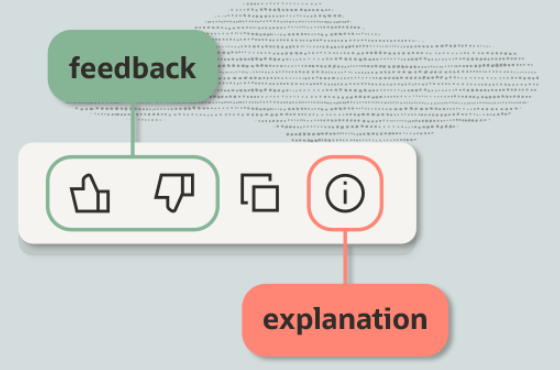
Oracle’s guidance is to use it before acting on a result. Ours said it “searched for available reports matching ‘Income Statement’ and selected the standard Income Statement report,” explained the switch to periods, and confirmed Parent Company as the default scope. It offers the report data and the list of reports it searched as CSV downloads.
It still didn’t name the report ID, and it didn’t mention cash or accrual. The explanation is the right place to look. It just doesn’t cover the two things that moved our answer the most.
Every account ships with three reports named “Income Statement”
The question of which report runs is not hypothetical. The account has 385 reports available through the connector. Three of them are titled exactly “Income Statement”: 109, 110 and −200. Ten more have the phrase in the title, including Budget Income Statement, Comparative Income Statement, Multi-Book Income Statement and Income Statement w Margin %.
Ask Oracle never considered 109 or 110. Show Explanation lets you download the list of reports it searched, with a score for each. Every one is a financial statement report:
| Report | ID | Score |
|---|---|---|
| Income Statement | −200 | 174.03 |
| Notes Income Statement | 391 | 154.44 |
| Budget Income Statement | −196 | 154.44 |
| Comparative Income Statement | −199 | 154.44 |
| Income Statement Detail | −204 | 154.44 |
| PM Comparative Income Statement | 392 | 140.74 |
| Budget Income Statement Detail | −195 | 140.74 |
| Cash Statement | −201 | 48.61 |
It picked the top score. The two in the 300s are custom reports in this account, and they’re in the running alongside Oracle’s.
The connector is different. It sees every report, 109 and 110 included, and nothing ranks them. In earlier testing, the same assistant asked the same question on different days picked different reports. 109 returns two unlabeled income amounts and their total. 110 returns five unlabeled rows with the expenses added to the revenue. Neither is net income.
These aren’t anybody’s mess. Reports 109, 110 and −200 exist in three unrelated accounts we have access to, a demo account and two production accounts in different industries, with the same IDs and the same titles. 151 positive report IDs carry identical titles in all three accounts. The highest one where all three agree is 293. The lowest one where they disagree is 306. Nothing straddles it. Seventy-two of the shared reports use NetSuite’s terminology substitution in their titles, things like “{#Sales Orders#} by Item Detail,” which only platform reports do. They run from ID 5 to 283.
So everything up to 293 ships with NetSuite, and the 300s and up are yours. You can clean up your own duplicates. One of the three accounts has a fourth “Income Statement” at ID 314 that somebody there created. The first three are permanent.
Your own reports matter more to Ask Oracle than Oracle’s duplicates do. Ask Oracle scores by title, and a custom financial report named exactly “Income Statement” would be competing with −200 on the same words.
Report IDs mean different things in different accounts
Above 293, the same ID is a different report in each account.
| ID | Account A | Account B | Account C |
|---|---|---|---|
| 306 | 12 Month Item Sales | Intrastat DK Sales Report | Billing Forecast Detail |
| 309 | Open Quotes by $ | VAT Report – Purchases by Tax Code | Custom Sales Matrix |
| 314 | Inventory Value – East | Sales Summary by Tax Code and Emirate | Income Statement |
Below 293 a report ID is portable. Above it, it isn’t. A custom tool, a saved prompt, a runbook, an instruction file for an AI client, anything that says “run report 378” is written for one account. Point it at another and it runs a different report. It won’t error.
Oracle says the AI respects your permissions. That isn’t the risk.
“AI operates within your existing roles and permissions, so it cannot access or act beyond what the user is authorized to do.”
Now read it again for what it covers. It’s a statement about access control. The AI can’t reach data you couldn’t reach, and can’t do things you couldn’t do.
It says nothing about whether the answer you get is a good answer.
An empty result reads like an answer. A query that returns nothing because your role can’t see those records looks identical to a query that returns nothing because those records don’t exist. “We don’t have any of those” and “you can’t see any of those” arrive in the same words.
A restricted total looks completely normal. If a role is restricted by subsidiary, department, class, location or a custom segment, every figure that role gets is already scoped to those, and nothing in the answer says so. A revenue number can be exactly right for what somebody is allowed to see and still not match what the CFO has. Two people ask the same question, get different numbers, and both are correct.
That one produces a disagreement in a meeting rather than an error on a screen.
So the permissions question to take into a NetSuite Next rollout isn’t “does it respect roles.” Oracle has answered that. It’s “which of our roles are restricted in a way that will silently scope an answer, and do the people holding those roles know?”
Access control is a security question and Oracle has handled it. This is an accounting question, and it’s yours.
The meter
NetSuite AI features consume AI Units. Usage is calculated from the actual processing a task required. Short, simple requests use fewer. Long requests, larger documents and multi-step actions use more.
You’ll read that each user gets 1,000 AI Units a month. That is not how it works. It’s 1,000 AI Units per month of term, provisioned upfront into a customer AI Unit Pool. A customer signing a 36-month term with 10 General Access users receives 360,000 AI Units for use throughout the term. One pool, handed over at the start. AI Units expire when the term expires. They don’t renew monthly and they don’t carry over.
There is no monthly reset to protect you. Nothing stops an enthusiastic first quarter from spending a meaningful share of a three-year allocation.
Development environments get their own separate pool, 10,000 AI Units per month of term, so testing doesn’t eat production’s allowance.
| Ask Oracle question type | Estimated AI Units |
|---|---|
| Simple | around 10 |
| Analysis | 10 to 50 |
| Research | 50 to 200 |
These are Oracle’s estimates and actual usage varies. Other features draw on the same pool: Text Enhance and Prompt Studio at 5 to 10, Transaction Matching Assistant at 5 to 10, the SuiteScript 2.1 N/llm module at 5 to 25, Case Summary at 5 to 75, and Narrative Insights at 5 to 200. Bill Capture, the EPM products and NetSuite Analytics Warehouse don’t consume AI Units at all.
1,000 AI Units per user per month of term buys roughly a hundred simple questions a month per user, or five to twenty research questions. One analytical question per working day at the top of Oracle’s range is about four times a single user’s monthly share.
That isn’t a reason to avoid the feature. It’s a reason to know which kind of question you’re encouraging before you hand it to sixty people.
Two switches, and a usage page that reports by person
The AI Unit usage page tracks AI Units per person and application. The usage history table carries Date, Name, Application and AI Units Used columns. You can see who spent what, on which feature, on which day. The pool shows as a single Total purchased AI Units figure.
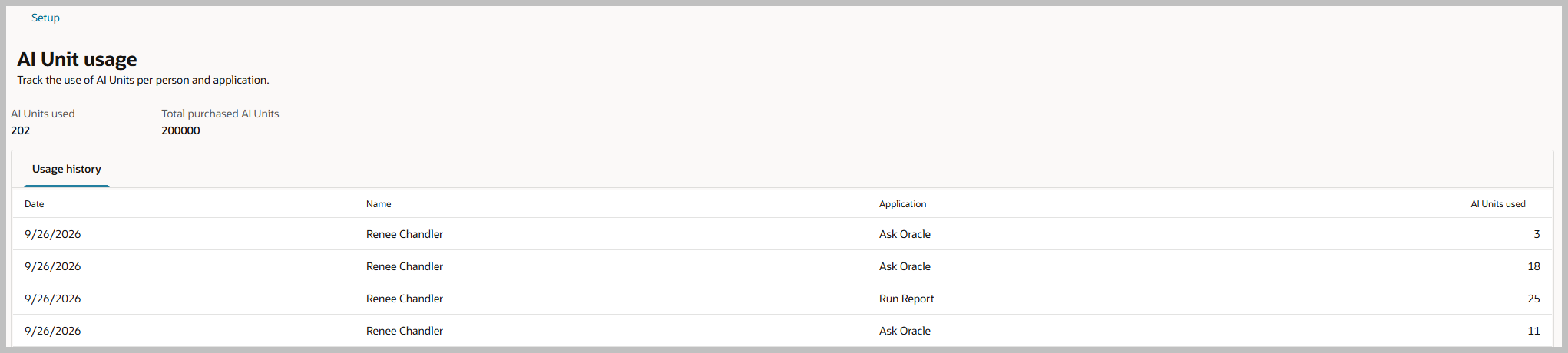
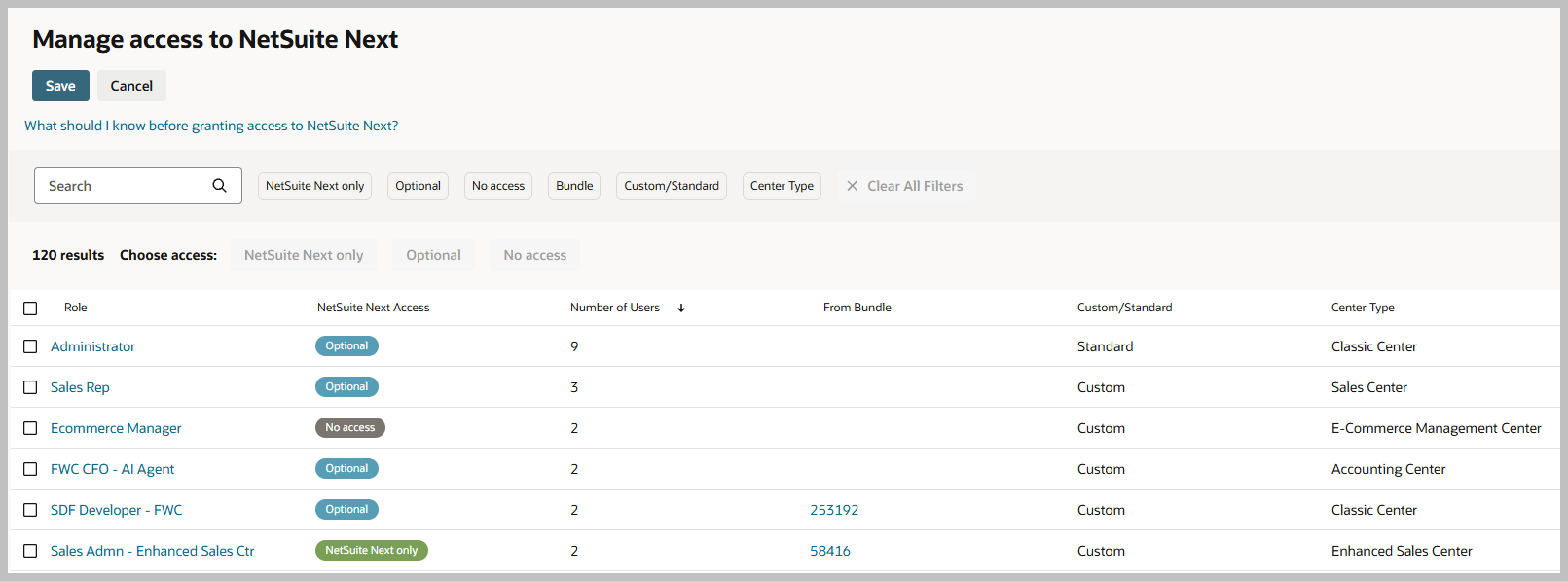
Ask Oracle has its own access control, separate from NetSuite Next. There are two independent pages:
Manage access to NetSuite Next sets each role to NetSuite Next only, Optional, or Blocked.
Ask Oracle Access has a Has Access checkbox per role.
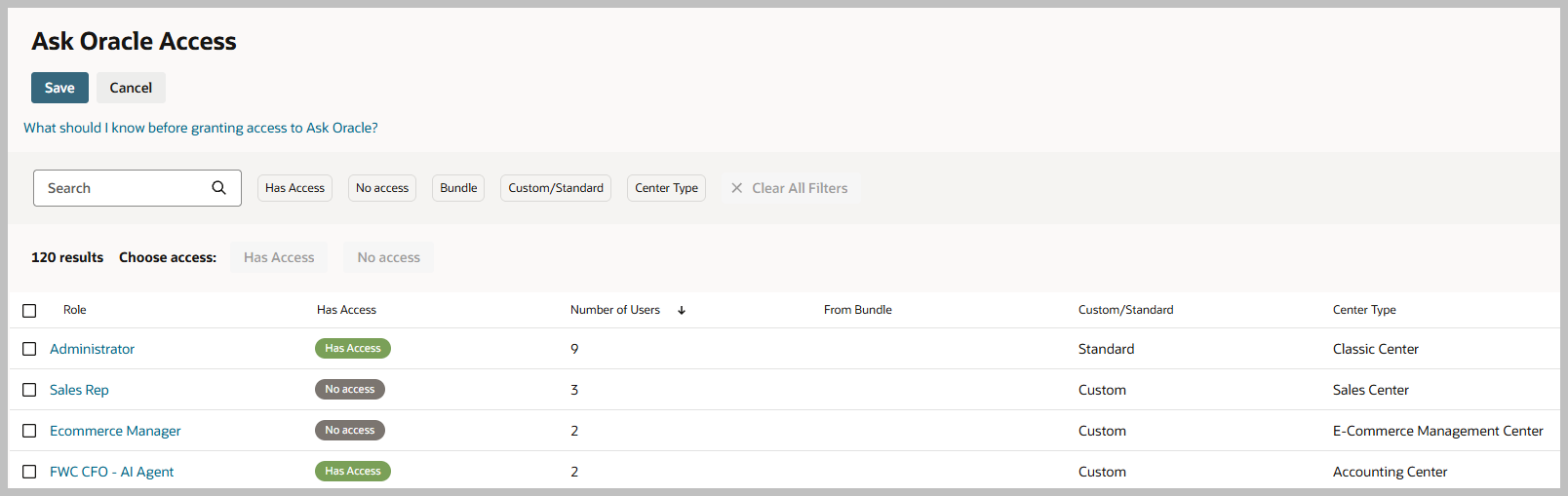
So you can give a role the redesigned interface without giving it the AI, or the other way round. Unchecking a role stops that role consuming units through Ask Oracle entirely, and you can change that access at any time.
What isn’t there: unit caps. You can’t cap a role or a person at a number, or reserve a balance for month-end. The control you have is a switch rather than a dial. Usage alerts are planned, and Oracle expects them to notify administrators at key thresholds, with no percentages given yet.
Rolling it out
Access is managed on the Manage Access to NetSuite Next page (Setup > Company > NetSuite Next Access), which only the Administrator role can open. Each eligible role gets one of three settings.
NetSuite Next only. Those users switch at their next login and can’t go back.
Optional. Users can move between NetSuite Today and NetSuite Next themselves, with no data migration or rework either way.
Blocked. Users stay on NetSuite Today and can’t reach NetSuite Next.
Optional is the setting most rollouts should start on. It gives a user who can’t find something a way out that doesn’t involve raising a ticket, and moving a role to Blocked later is a setting rather than a project.
Several role types can’t use NetSuite Next at all. Customer Center, Employee Center, Vendor Center, Partner Center and Advanced Partner Center are ineligible.
Try it in a preview account first. A preview account takes a couple of days to build and holds a copy of your company’s data, so it doesn’t touch your live account. Then grant NetSuite Next on Optional to one team, leave Ask Oracle Access unchecked for everyone but a small group, and read the AI Unit usage page after a few weeks. Widen it with a real consumption rate instead of a guess.
What readiness actually means
Most of the readiness advice going around is fine. Retire unused scripts, rationalize roles, fix integration errors, clean up master data. All things you should be doing anyway.
Oracle adds one that matters more than it sounds: update the AI Descriptions on your custom fields and records so the AI features know what they’re for. A field called custbody_adj_flag means something to the person who built it and nothing to an assistant.
Here are six more.
Know your cash basis setting. Check Setup > Accounting > Accounting Preferences > General subtab > Cash Basis Reporting and make sure it’s what your finance team expects every report to show. Every answer Ask Oracle gives about income follows it.
Look for transactions posted outside their dates. Search for anything where the posting period doesn’t match the transaction date by more than a month. Those are where a date-based answer and your financial statements disagree. Some will be legitimate. Some will be mistakes nobody has noticed because nothing ever compared the two.
Audit your report and saved search names. Anywhere two things share a name, or a name promises something the output doesn’t deliver, you have a coin flip waiting for the first person who asks in plain language. Start with anything named after a financial statement. The three Income Statements that came with NetSuite will still be there when you’re done, so the goal is to stop adding to them.
Check anything that names a report by ID. Custom tools, saved prompts, runbooks, AI instruction files. Below 293 the ID is safe. Above it, that number means a different report in a different account.
Map your restricted roles. List every role scoped by subsidiary, department, class, location or custom segment, and write down what a total looks like from inside each one.
Separate the two switches, and watch the usage page by name before you widen access.
And one habit. When an assistant gives you a number, click Show Explanation, then open the report it links to and check the report ID, the periods and the basis. The explanation covers the periods. The report ID is in the URL. The basis is in Accounting Preferences.
What we don’t know
We don’t know what these questions cost. We haven’t matched them to the AI Unit usage page yet.
We don’t know what Ask Oracle does when two reports tie. Here −200 won by twenty points. In an account with a custom report titled exactly “Income Statement,” it might ask, or it might just pick one.
Planning a NetSuite Next rollout and want a second opinion on what’s actually in the account? The first hour is free. We’ll run the same tests on yours and tell you what we find, including if the answer is that you’re in good shape.