How a public team page, a web store login and a default role on Sticky Notes added up to locked-out staff and files nobody on staff created.
This is the story behind our article Secure your NetSuite account before somebody tests it.
What happened
Around 3:00 one afternoon in September, an e-commerce client with a SuiteCommerce web store started getting a flood of NetSuite lockout emails. Their staff couldn’t log in, and nobody could tell yet whether anyone had gotten in.
Logins against the account went from a normal 500 or so to about 1,500.
The attacker started with the company’s team page. It had everybody’s name on it. From there they tried the usual email formats, first.last@ and first initial plus last name.
They came in through the web store login, not the NetSuite login page. The screen gives the same message whether the email or the password is wrong, so they couldn’t tell which guesses were real users. They didn’t need to. Every right guess locked somebody out. The login log is where the difference shows up, marking each attempt as a wrong email, a wrong password or a locked account.
Then they locked people out on purpose. NetSuite locks a user for 30 minutes after five failed logins. The attacker failed five times, waited about 25 minutes, and did it again, working through the staff list over and over.
They also registered their own web store account, which put them in the Customer Center role. That role had been given access to Suitelets it had no reason to reach. Some of that came with NetSuite’s own bundles, like Sticky Notes, which ship with the default Customer Center role in the audience on their scripts.
The files
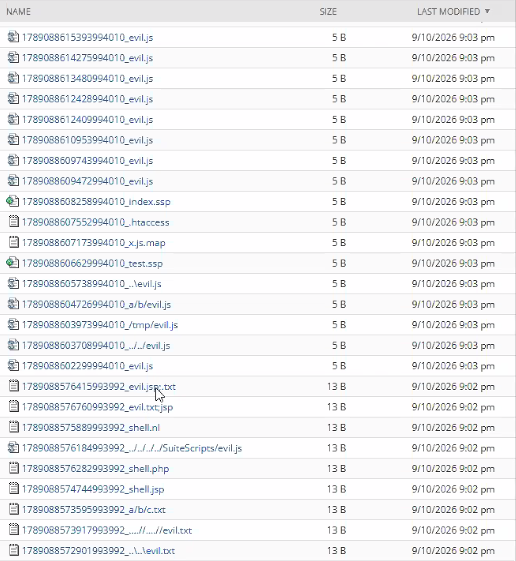
Around 9:00 that night, dozens of files showed up in the Sticky Notes files folder in the File Cabinet, all written through the Sticky Notes upload. The names tell you what they were after: evil.js, shell.php, shell.jsp, .htaccess, index.ssp. Some had path tricks in the name, like ../../SuiteScripts/evil.js, trying to land a file in the SuiteScripts folder where it could run.
Every file was 5 to 13 bytes. They look like tests to see what the upload would accept, not working code. The path tricks stayed in the file names and everything landed in the Sticky Notes folder. But they got a script to write into the File Cabinet for them, and that was the part that mattered.
The fix
- A new Customer Center role with no access to any of those scripts, and every customer moved to it. The default role was still sitting in the audience on Sticky Notes and the rest, so a new role was the cleanest way to cut it off.
- Single sign-on through Google Workspace for staff. The Google side now enforces the login, and a username on its own is no good to anybody.
- A custom administrator role, since the standard Administrator role can’t log in through SSO. The custom role looked like it had everything Administrator has, but it didn’t. Some things only work from the standard role.
- A text alert when failed logins spike, using the Head in the Cloud SMS Integration app and a Twilio account. The next time, somebody hears about it from a text, not from staff who can’t get in.
What it would have taken to prevent
Every piece of this was open before the attack. A public team page, Customer Center with script access, and no alert on failed logins. None of it is unusual. We find some version of it in most accounts we review.
Want to talk?
If you’re not sure what your web store roles can reach, we’ll look at it with you in your account. See our NetSuite Security program, or Book a free hour.
Author: Renee Chandler, Fourth Wave Consulting.